 NetGuard
NetGuard for iPhone
WiFi Scanner for iPhone: See Every Device on Your Network
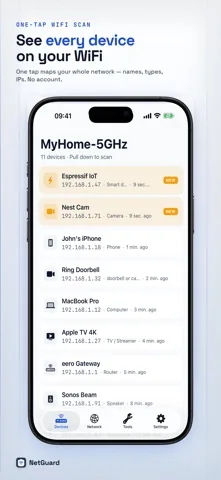
NetGuard scans your WiFi network in one tap and lists every connected device with a friendly name, type, IP address, and the services it exposes.

- Free, ad supported
- iOS 17.0 or later
- Utilities
- Version 1.5.0
- No account
- No data collected
On your iPhone
Four screens, one network
What it does
Five things NetGuard gives you
-
01
A one tap scan of your whole WiFi
NetGuard walks every address in your local subnet, browses for Bonjour services and asks for a reverse DNS name, then folds the answers into a single list.
-
02
What changed since last time
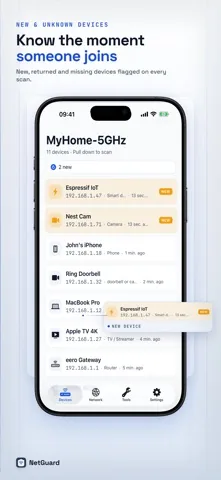
Every scan is compared with the one before it. New, returned and missing devices are flagged, so a device you have never seen stands out immediately.
-
03
A profile for every device
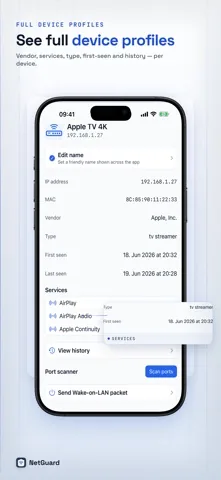
Name, type, IP address, the Bonjour services it exposes, and when it was first and last seen. Rename anything so it stays recognizable next time.
-
04
A network security score
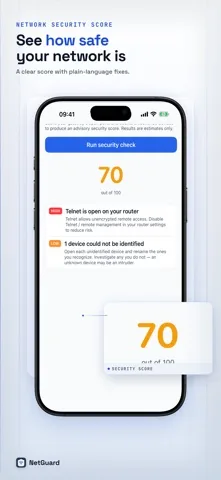
NetGuard Pro checks your router for risky open ports, scores the result out of 100 and writes each finding as a plain language fix you can act on.
-
05
The tools that go with it
Speed test for download, upload and ping, plus ping and DNS lookup. Pro adds a port scanner, traceroute, Wake on LAN and CSV and PDF export.
-
06
Nothing leaves your phone
Scans run on your iPhone against your own local network. NetGuard does not collect your data, and there is no account to create.
Download
Scan your network in about a minute
NetGuard is free and ad supported. Install it, tap scan, and you have your device list before the kettle boils.
Use cases
When people actually open a network scanner
-
The internet feels slow and you want to know why
Run the speed test to get download, upload and ping figures, then scan to see how many devices are sharing the line. A streaming box, a games console and a laptop backing up at the same time explain a lot of evening slowdowns.
-
You suspect somebody is on your WiFi who should not be
Scan once with everything you own switched on, name each device you recognize, then scan again. Anything left unnamed is worth a closer look. Pro keeps a new device alert log so you also see who joined while you were out.
-
You just moved in and inherited a router
The router security check looks for services that should not be reachable, such as Telnet, FTP, SMB or an admin page served over plain HTTP, and tells you what to switch off in the router settings.
-
You are setting up smart home gear
Printers, speakers, TV streamers and HomeKit accessories announce themselves over Bonjour. NetGuard shows which services each one advertises and at which IP address, which turns a silent setup problem into something you can see.
-
You need the list somewhere else
Pro exports every device with its name, IP address, type, services and first and last seen dates as CSV, or as a dated PDF device report you can hand to somebody.
Free and Pro
What is free, and what the one-time purchase adds
| Capability | Free | Pro |
|---|---|---|
| Scan your WiFi and see every device | Yes | Yes |
| Device details: name, type, IP, Bonjour services | Yes | Yes |
| Current network, connectivity and public IP | Yes | Yes |
| Speed test: download, upload and ping | Yes | Yes |
| Ping and DNS lookup tools | Yes | Yes |
| Ads | Shown | Removed |
| Network security score with plain language fixes | No | Yes |
| New device alert log and background intruder alerts | No | Yes |
| Name and track your devices | No | Yes |
| Port scanner, traceroute, Wake on LAN, router security check | No | Yes |
| CSV and PDF export | No | Yes |
Pay once and keep it forever. No subscription. No tracking. The current price is shown in the App Store and inside the app.
Honest limits
What iOS lets a scanner see
iOS does not expose MAC addresses to apps. That is a platform rule, not a NetGuard shortcoming, and it applies to every WiFi scanner on the App Store. Device identity therefore comes from names and services: the reverse DNS name a device answers with, the Bonjour services it advertises, and its address on your network.
In practice that means a printer, a TV streamer, a speaker, a computer or a HomeKit accessory usually identifies itself well, while a cheap sensor that advertises nothing may show up only as an address. NetGuard flags those devices rather than guessing, and lets you name them once so they stay recognizable.
Read how the scan works step by step, including the Bonjour service types NetGuard listens for.
Download
Free to scan, ad supported
iPhone, iOS 17.0 or later. No account, no data collection.
FAQ
Frequently asked questions
Is there a free WiFi scanner app for iPhone?
Yes. NetGuard is a free iPhone app that scans your WiFi network in one tap and lists every connected device with a friendly name, type, IP address, and the services it exposes. The free version is ad supported and also includes a speed test plus ping and DNS lookup tools. An optional one-time Pro purchase removes the ads.
How does NetGuard find devices on my WiFi?
NetGuard probes every address in your local subnet, browses for Bonjour services such as AirPlay, Google Cast, HomeKit, printing and file sharing, and asks the network for a reverse DNS name for each address that answers. It combines those three signals into one list with a friendly name and a device type.
How many devices can NetGuard find?
NetGuard lists every device that responds on your local WiFi network, so the number depends on how many are connected. Each device appears with its name, type, IP address, and the services it exposes, and new, returned and missing devices are flagged after every scan.
Why does NetGuard not show MAC addresses?
iOS does not expose MAC addresses to apps, so no iPhone scanner can build device identity from hardware IDs. NetGuard identifies devices by their reverse DNS name, the Bonjour services they advertise and their position on the network, and it lets you rename any device so it stays recognizable across scans.
Does NetGuard collect my data?
No. NetGuard is built privacy first and does not collect your data. Scans run on your iPhone against your own local network, there is no account to create, and nothing about your network is uploaded or tracked. This applies to both the free version and the one-time NetGuard Pro purchase.
What does NetGuard Pro add?
NetGuard Pro removes all ads permanently and adds a network security score with plain language fixes, a new device alert log, background intruder alerts, the ability to name and track devices, a port scanner, traceroute, Wake on LAN, a router security check, and CSV and PDF export.
Is NetGuard Pro a subscription?
No. NetGuard is free to download, and the optional NetGuard Pro upgrade is a one-time purchase rather than a subscription. You pay once and keep Pro forever, with no renewals or recurring charges.
Can NetGuard alert me when a new device joins my network?
Yes, with NetGuard Pro. Pro keeps a new device alert log and can send background intruder alerts when an unknown device joins your WiFi. It also flags what changed between scans, meaning new, returned and missing devices, and lets you give the devices you recognize friendly names.
Guides