 NetGuard
NetGuard / Port scanner for iPhone
Feature
Port Scanner for iPhone: Check 36 Common Ports on Any Device
A device answering on your network is one fact. What that device is willing to talk to is another, and a port scan is how you get it.

What it does
How the scan runs
NetGuard opens a normal connection attempt to each port in turn, all of them in parallel, and records which ones accept. A port that accepts is open, a port that refuses is closed, and a port that never answers within the timeout is treated as closed too. Nothing is sent to the device beyond the connection attempt itself.
- 36 ports per device
- TCP connect
- Local network only
- NetGuard Pro
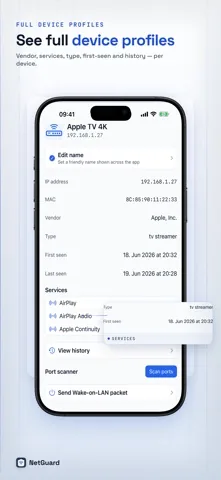
The scan is deliberately restricted to your local WiFi and does not run over a cellular connection. You start it from a device profile, so it always targets one device you picked, and the router security check runs the same scan against your gateway.
Reference
Every port NetGuard checks, and what it means at home
The list is chosen for home and small office networks rather than for a data center. It covers remote access, file sharing, printing, media, mail, databases and the few ports that consumer devices are known for.
| Port | Service | What an open port usually means |
|---|---|---|
| 21 | FTP | Unencrypted file transfer. Rarely wanted on a home network. |
| 22 | SSH | Encrypted remote login. Normal on a server or a hobby computer. |
| 23 | Telnet | Unencrypted remote login. Should be closed on anything modern. |
| 25 | SMTP | Mail transfer. Unexpected on a home device. |
| 53 | DNS | Name resolution. Normal on a router or a local DNS filter. |
| 80 | HTTP | A web interface without encryption. Common on routers and cameras. |
| 110 | POP3 | Legacy mail retrieval. |
| 135 | RPC | Windows remote procedure calls. |
| 139 | NetBIOS | Legacy Windows sharing. Usually safe to disable. |
| 143 | IMAP | Mail retrieval without encryption. |
| 443 | HTTPS | An encrypted web interface. Preferable to port 80. |
| 445 | SMB | Windows file sharing. Fine inside a trusted network, risky beyond it. |
| 548 | AFP | Apple file sharing, mostly on older Macs and network drives. |
| 554 | RTSP | A camera or a media server streaming video. |
| 587 | SMTP submission | Mail sending. |
| 631 | IPP | Internet printing. Expected on a printer or a print server. |
| 873 | rsync | File synchronization, often a backup job. |
| 993 | IMAPS | Encrypted mail retrieval. |
| 995 | POP3S | Encrypted legacy mail retrieval. |
| 1080 | SOCKS | A proxy. Worth explaining if you did not set it up. |
| 1433 | MSSQL | Microsoft SQL Server. |
| 1521 | Oracle | Oracle database listener. |
| 1723 | PPTP | An outdated VPN protocol. |
| 2049 | NFS | Unix file sharing, often a network drive. |
| 3306 | MySQL | MySQL or MariaDB database. |
| 3389 | RDP | Windows Remote Desktop. Should not be broadly reachable. |
| 5060 | SIP | Voice over IP signaling, common on routers with phone features. |
| 5353 | mDNS | The Bonjour discovery service itself. |
| 5432 | PostgreSQL | PostgreSQL database. |
| 5900 | VNC | Screen sharing and remote control. |
| 8009 | Chromecast | A Google Cast receiver. |
| 8080 | HTTP alt | A second web interface, often an admin panel. |
| 8443 | HTTPS alt | An encrypted admin panel. |
| 9100 | JetDirect | Raw printing. Expected on a network printer. |
| 32400 | Plex | A Plex media server. |
| 62078 | iOS sync | An iPhone or iPad offering WiFi sync. |
Interpretation
An open port is not automatically a problem
-
Ask what the device is for
Port 631 open on a printer is the printer working. The same port open on a thermostat deserves a question. Read the result against the device, not against a list.
-
Prefer the encrypted twin
Several services come in pairs: 80 and 443, 143 and 993, 110 and 995, 21 and SFTP over 22. If both halves are open and you control the device, close the unencrypted one.
-
Remote access is the category to watch
Telnet, RDP and VNC give someone control of a machine rather than access to a file. Those three carry the heaviest penalty in the network security score for that reason.
-
Scan only what is yours
A port scan is a normal connection attempt, but scanning networks and devices you do not own or have permission to test is not acceptable practice and may be unlawful where you live. Keep it to your own network.
Download
The port scanner is part of NetGuard Pro
NetGuard is free to download and ad supported. The port scanner, traceroute, Wake on LAN, the router security check and CSV and PDF export come with the one-time NetGuard Pro purchase. No subscription.
Keep going