 NetGuard
NetGuard / Router security check
Feature
Router Security Check on iPhone: Score Your Network and Fix What Is Open
The check scans your gateway, subtracts points for services that should not be reachable, and writes each finding as an instruction you can carry out in your router settings.

The score
How a number out of 100 is arrived at
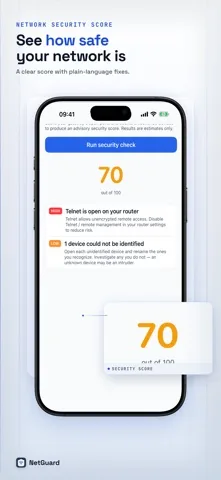
Everyone starts at 100. NetGuard scans the router for open ports and counts how many devices on the network it could not identify, then subtracts a fixed penalty for each finding. There is no weighting you cannot see and no hidden model: the whole calculation is the table below.
Reference
Every rule behind the score
Eight port rules plus one rule about devices NetGuard could not name. Findings are sorted with the most severe first, and the score is held between 0 and 100.
| Port | Finding | Severity | Points |
|---|---|---|---|
| 23 | Telnet is open on your router | High | 25 |
| 3389 | Remote Desktop is reachable | High | 25 |
| 5900 | Screen sharing over VNC is reachable | High | 25 |
| 21 | FTP is open on your router | Medium | 10 |
| 445 | Windows file sharing is exposed | Medium | 10 |
| 139 | Legacy NetBIOS sharing is exposed | Medium | 10 |
| 80 | Router admin page uses unencrypted HTTP | Low | 5 |
| 8080 | An admin page uses unencrypted HTTP | Low | 5 |
| n/a | Devices that could not be identified | Low or medium | 5 or 10 |
The last rule scales with the count: one or two unidentified devices is a low severity finding worth 5 points, three or more raises it to medium and 10 points. The reasoning is simple. A single quiet sensor is normal. Three devices nobody in the house can account for is a pattern.
What to do
The fix for each finding
-
Telnet open on port 23
Telnet allows unencrypted remote access. Disable Telnet or remote management in your router settings. This is the single heaviest penalty in the score, and on a modern router there is no good reason to leave it on.
-
Remote Desktop on port 3389
RDP is exposed on your network. Disable it, or restrict it to trusted devices reachable only through a VPN.
-
Screen sharing on port 5900
VNC remote control is exposed. Turn it off, or require a strong password and reach it only over a VPN.
-
FTP on port 21
FTP sends data unencrypted, credentials included. Disable FTP on the router, or move the transfer to SFTP.
-
File sharing on ports 445 and 139
SMB file sharing is reachable. Limit it to trusted devices and switch it off when it is not in use. NetBIOS is an outdated sharing protocol, so disable it unless you are deliberately using it.
-
An admin page on port 80 or 8080
The interface is served over plain HTTP, so the password travels in the clear on your own network. Prefer HTTPS access and set a strong admin password.
-
Devices that could not be identified
Open each one and rename the ones you recognize. Investigate the ones you do not, because an unknown device may be an intruder. The identification method is here.
Honest reading
What the score does not claim
A high score is not a clean bill of health. The check looks at a fixed list of ports on your gateway and at how many devices it could not name. It does not inspect firmware versions, passwords, encryption settings or anything on the far side of the router, so a score of 100 means those particular checks found nothing, not that the network is secure.
It is deliberately built that way. Every finding names something you can verify yourself in your router settings, and NetGuard never tells you that your network is safe.
Three settings the check cannot see, and that are worth confirming by hand: the network is on WPA2 or WPA3 rather than WEP or open, WPS push button pairing is switched off, and the router firmware is current.
Download
The security check is part of NetGuard Pro
NetGuard is free to download and ad supported. The security score, the router check, the port scanner, traceroute, Wake on LAN and CSV and PDF export come with the one-time NetGuard Pro purchase. No subscription.
Keep going